How to Choose a Desktop Flight Tracker: 5 Questions to Ask
A desktop flight tracker is a small screen that shows the aircraft flying near you, so you can see which plane just went over without reaching for your phone. They differ in ways that matter before you buy: how many aircraft they show, whether they can look up one flight, what they cost to keep running, what they need from your WiFi, and where in the world they work.
I build one of them, Squawk Box, so I have put it in the same table as the others, limits included. Everything I say about another maker’s device comes from that maker’s own page, read on 10 October 2026, and each page is linked.
The kinds of desktop flight tracker
Five kinds turn up when you look, and they suit different people.
- LED matrix displays show one flight, or a few, on a grid of lit pixels. NearestPlane and TheFlightWall make this kind.
- Round-screen and clock-style units put flight details on a small round display. JetClock Desk is one, and its maker also sells an HDMI box and a tablet app.
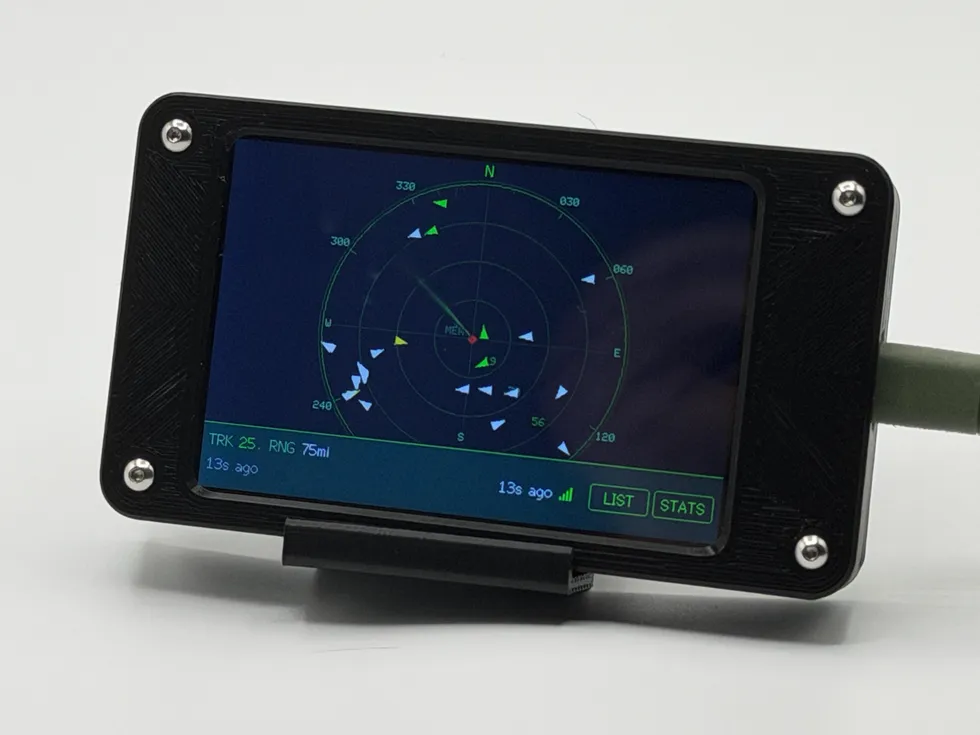
- A touchscreen radar draws aircraft on a scope. Squawk Box is this kind.
- Build-it-yourself projects hand you the files and the parts list. Micro Radar is an open-source example.
- Phone apps and websites do the same job without a device on your desk. I leave them out here, because they live on a screen you already own.
Five questions to ask
1. How many aircraft does it show at once, and can it look up one flight?
Some trackers show only the nearest aircraft. Some show a handful, and a radar scope can show many. A few can also follow a flight you name by flight number, while others show only what is overhead. Neither design is wrong; they answer different questions. If you want to follow a particular flight, look for a lookup. If you want to know what just went over the roof, the nearest aircraft or a scope will do it.
Squawk Box shows up to 25 aircraft at once and has no flight lookup.
2. How fresh is the data, and where does it come from?
Ask for the refresh time as a number, and read it on the maker’s own page. I have left refresh figures out of the table below, because they are easy to quote loosely and they change.
Then ask where the positions come from. A tracker that needs only WiFi, with no antenna of its own, is getting its positions over the internet from other people’s receivers, and a feed like that can change. What Is ADS-B? explains the signal behind all of it.
Squawk Box refreshes about every 90 seconds, so it is not a second-by-second view. Its positions are relayed through my servers and partly sourced from adsb.lol, a community network of volunteer receivers.
3. What does it cost to keep running, and does it need an app or an account?
Look at three things separately: a subscription, a phone app and an account. Makers handle them differently, and the table below shows what each one says.
Squawk Box has no subscription, app or account. You pay once on Etsy and set it up in your phone’s browser. Whatever the answer on any device, one that shows live data depends on a feed somebody else runs, so ask what happens if that feed changes. Mine is answered at the bottom of the Squawk Box page.
4. What does it need from your WiFi, and from you?
Many small gadgets can join only a 2.4 GHz network, so check before you order. Squawk Box needs one and cannot join a 5 GHz-only or WPA3-only network, or one with a sign-in page. The JetClock Desk page also says that clock works only with 2.4 GHz networks.
Then there is your own time. Squawk Box setup takes a few minutes in your phone’s browser, and aircraft start appearing within about a minute. A build-it-yourself project adds parts to order, a case to print and a board to flash.
5. Where does it work, and who stands behind it?
Check the countries first. NearestPlane says you can set any location in the world. Squawk Box works in the United States only, and setup takes a US location.
Then ask who built it and what happens if it fails. Squawk Box comes assembled, I make each one by hand in Olive Branch, Mississippi, and it carries a 90-day maker warranty. I have not compared warranty terms for the others, because they change. Read each maker’s page.
Five devices, side by side
Every cell below is what the maker says on its own page, read on 10 October 2026. I left out prices, ratings and refresh figures. If a page has changed since, the maker’s page is right and this one is out of date.
| Device | What it is | What it shows | Cost, app and account | Where it works |
|---|---|---|---|---|
| NearestPlane | WiFi LED display with a 64 × 32 matrix, handmade in the UK | The nearest aircraft, with an optional second screen for the next three; it can also follow one flight you name by flight number | No app, no account and no subscription | Any location in the world, set during setup |
| TheFlightWall Mini | LED matrix display, 128 × 64 | Up to 5 flights at a time, in Flight Tracking Mode (by flight number, callsign or tail number) or Area Tracking Mode, one mode at a time | No subscription for its base features; setup uses the maker’s free phone app | Global flight data, which the maker says may be limited in parts of the Middle East, Africa, Russia and China |
| JetClock Desk | 2.1 inch round screen, made in the UK; the maker also sells an HDMI box and a tablet app | Flight details for aircraft up to 200 km away, plus extras such as weather and the ISS | Set up on a web page, no app; an optional paid tier, JetClock X, which the maker says the clock does not need | Not stated on the pages linked here; ask the maker |
| Micro Radar, a build-it-yourself project | ESP32-C3 board with a built-in round 240 × 240 screen; you print the case and flash it | A live view of flights over your location, within a radius you set | Open source (MIT license); you buy the parts; flight data comes from OpenSky’s API | You set your own location on its setup page |
| Squawk Box | 3.5 inch color touchscreen radar, assembled by hand in Olive Branch, Mississippi | Up to 25 aircraft at once within 25, 50 or 75 miles of your home; no flight-number or worldwide lookup | No subscription, app or account; you pay once on Etsy | United States only |
Other pages I read for the table: the TheFlightWall FAQ for its modes, shipping countries and data coverage, and JetClock’s JetClock X page for its optional paid tier.
Build or buy
If you like to build, Micro Radar is a real option. It is open source under the MIT license, built on an ESP32-C3 board with a round 240 × 240 screen already attached. The README lists the parts, tells you to print four STL files for the case, to set the threaded inserts with a soldering iron, and to flash the board from VS Code with PlatformIO. Its flight data comes from the OpenSky Network, and the README says a free OpenSky account raises the daily limit.
If you would rather plug something in and have it work, buy a finished one. The difference is mostly your time.
Where Squawk Box fits, and where it does not
Squawk Box shows up to 25 aircraft at once, within 25, 50 or 75 miles of your home, on a 3.5 inch color touchscreen with radar, list, detail and stats views. Tap a plane for its type, operator, tail number and an hour of altitude history. When one passes within three miles below 20,000 feet, a LOOK UP message tells you which way to face. It arrives assembled, about 4.2 inches wide, 2.35 tall and 0.72 deep.
Here is where it falls short:
- It works in the United States only.
- It has no flight-number lookup and no worldwide view.
- It refreshes about every 90 seconds.
- It needs a 2.4 GHz WiFi network.
- With more than 25 aircraft in range, it shows a selection of 25.
- The screen is 3.5 inches, so it is a desk or shelf gadget rather than a wall display.
If those fit how you look at the sky, the Squawk Box page has the details. If you want a flight lookup, or you live outside the United States, one of the others in the table may suit you better, and I would rather you buy the right one.
What none of these are for
I make Squawk Box for recreational use, not for navigation or flight following, and I would not use any desk tracker for either. If you are shopping for a pilot or a plane spotter, the gift guide goes through what they are likely to use.
These pages change. If you spot something here that has gone out of date, message me through the Etsy shop and I will correct it.
QUICK ANSWERS
Fair questions
What is a desktop flight tracker?
A desktop flight tracker is a small screen that shows the aircraft flying near your home, so you can see which plane just went over without reaching for your phone. Some show only the nearest aircraft, some show a handful, and some draw a radar scope with many.
How do I choose a desktop flight tracker?
Ask five questions: how many aircraft it shows at once and whether it can look up one flight, how fresh its data is and where it comes from, what it costs to keep running and whether it needs an app or an account, what WiFi it needs, and where in the world it works. Then check each answer on the maker's own page.
Do I need an ADS-B receiver to use a desktop flight tracker?
Not always. A receiver is a small radio and antenna that picks up aircraft broadcasts yourself. Squawk Box and the open-source Micro Radar get their positions over the internet instead, so neither one needs a receiver.
Does Squawk Box work outside the United States?
No. Squawk Box works in the United States only, and setup takes a US location. Another maker in the comparison says its device works from any location in the world, so check the maker's own page for the one you are considering.
Where do the facts about the other trackers come from?
Each fact about another maker's tracker comes from that maker's own website, read on 10 October 2026, and every page is linked in this note. I left out prices, ratings and refresh figures because they change. If a page has changed since, the maker's page is right and this one is out of date.
MORE LAB NOTES
- Magnitude vs. Intensity: The Two Numbers Every Earthquake Gets
- What Is a Starlink Train? The String of Lights, Explained
- Weather Watch vs. Warning vs. Advisory: The Severity Ladder
- The Board Inside Every PlankLabs Gadget
- The Printers Behind the Shells: a Flashforge AD5X and a Bambu Lab X2D
- Arduino: The Workbench My Firmware Is Built On
- How the Outdoor Score Works: One Honest Number for “Should I Be Outside?”
- How to Read a Tide Chart (and Why Old Tide Clocks Drift)
- What Is ADS-B? How Flight Tracking Actually Works
- When Can You Actually See the ISS? Visibility Windows, Explained
- Is It Your WiFi or Your ISP? How to Tell in 60 Seconds