How the Outdoor Score Works: One Honest Number for “Should I Be Outside?”
Every Storm Sentinel screen shows a number between 0 and 99 called the Outdoor Score. People ask about it more than anything else I build — usually right after it disagrees with them. So here’s exactly how it’s calculated, straight from the firmware. (Internally the code calls it the Sentinel Score, which is what happens when you name things at midnight.)
The design brief was one sentence: answer “will I enjoy being outside right now?” with a single glanceable number. Not “is it dangerous” — that’s what official warnings are for — but the everyday question you currently answer by reading five different metrics and doing arithmetic in your head.
Start perfect, subtract honestly
The score starts every calculation at a flawless 100, and the weather takes deductions from there. There’s exactly one way to earn points back, and it’s tiny (I’ll get there). Whatever survives is clamped at the bottom to 0 and capped at the top at 99, never 100. The comment in the code explains the missing point: nothing is ever truly perfect.
Three layers take their cut, covering three different time horizons: what’s officially hazardous, what’s coming in the next six hours, and what’s physically happening right now.
Layer one: what NWS says
Active alerts carry the biggest penalties, scaled by severity: an Extreme alert costs 80 points, Severe costs 50, Moderate 25, Minor 10. Two refinements keep that from being dumb:
- Watches are discounted. A watch means conditions are possible later; a warning means it’s happening. A Tornado Watch at 50% weight shouldn’t flatten a score the way a Tornado Warning at full weight absolutely should.
- Duplicate hazards collapse. The Weather Service loves issuing three products for one heat wave. Alerts get sorted into families — heat, cold, snow, storm, flood, wind, fog — and only the strongest penalty in each family counts. Then the worst family lands at full weight and every other distinct hazard adds half: three simultaneous problems are worse than one, but not three times worse.
Layer two: the next six hours
The score averages the precipitation chances across the next six hourly forecast periods, and charges 0.6 points per percentage point above 20%. Anything at or below a 20% chance is free — that’s background noise in a forecast. A 50% afternoon costs 18 points. This is the “should I start a long hike right now” term: the current sky may be lovely, but the score can see the radar’s future.
Layer three: right now, on your skin
The live station observation pays the rest. Every factor has a free comfort zone; beyond it, points drain at a per-unit rate. Temperature is free from 60 to 80°F. Dewpoint under 65°F costs nothing (and above it, quite a lot — dewpoint is the honest humidity number). Wind is free under 12 mph sustained, gusts under 25. Low visibility bills at 3 points per missing mile below 5.
The temperature curve is deliberately progressive: the first fifteen degrees outside the comfort band cost 0.9 points each, and everything past that costs double. An early version used a flat rate, which let a 95°F day score in the 90s — a number nobody who has actually stood in a 95°F day believed. The doubled slope is what belief costs.
Then the sky itself takes its cut, based on what the station reports is actually falling: a thunderstorm overhead costs 30, and so does freezing rain — ice is arguably the worst walking weather there is, and it’s rated accordingly. Plain rain costs 25, snow 20, fog 10, a gray overcast lid 8.
And the lone bonus: clear skies earn +3 — but only during daytime, and only between 55 and 85°F. A cloudless 100°F afternoon gets nothing, which is exactly what it deserves.
What the number means
Five bands drive the label and the color ring around the score:
- 90–99 — Picture Perfect (green)
- 70–89 — Pretty Nice
- 45–69 — Tolerable (yellow)
- 20–44 — Stay Inside (orange)
- 0–19 — Brutal (red)
Three real-shaped examples, penciled out: a muggy July afternoon — 88°F, dewpoint 72, storms brewing at 40% for later — lands at 71, Pretty Nice, with an asterisk you can feel. A raw November day at 34°F with an 18 mph wind under full overcast comes out 50, Tolerable, if you dress like you mean it. And a Severe Thunderstorm Warning overhead, rain hammering, radar full of red? The math goes so far negative it floors at 0, Brutal — which is the score working as intended.
That’s the whole machine: start from perfect, let the alerts, the forecast, and the present moment each speak, subtract honestly, and never quite admit perfection. One number, no arithmetic left for you to do — the sky already did it.
QUICK ANSWERS
Fair questions
Why does the Outdoor Score max out at 99 instead of 100?
Deliberate design. The comment in the source code says it plainly: nothing is ever truly perfect. A 99 means the sky has done everything you could reasonably ask of it. The last point is reserved for a day that doesn’t exist.
It’s sunny out, so why is my score only in the 60s?
Sun is one input among many. A clear sky can’t outrun a 72°F dewpoint, a gusty wind, or a Heat Advisory, and a watch for later (severe storms ‘possible this evening’) quietly costs points even while the current sky looks innocent. The score is reading more of the situation than your window is.
What happens if the weather station data is missing?
If there’s no live observation to read, the score doesn’t guess. It parks at a neutral 50 until real data returns. A number with no evidence behind it would be worse than no number.
Is the Outdoor Score a safety index?
No. It’s a comfort-and-enjoyment score, answering ‘will I like being out there?’ For warnings, evacuations, and anything safety-critical, always follow official National Weather Service guidance directly, which the device shows in full on its Watches & Warnings screen.
THE GADGET FOR THIS OBSESSION
Put it on your desk
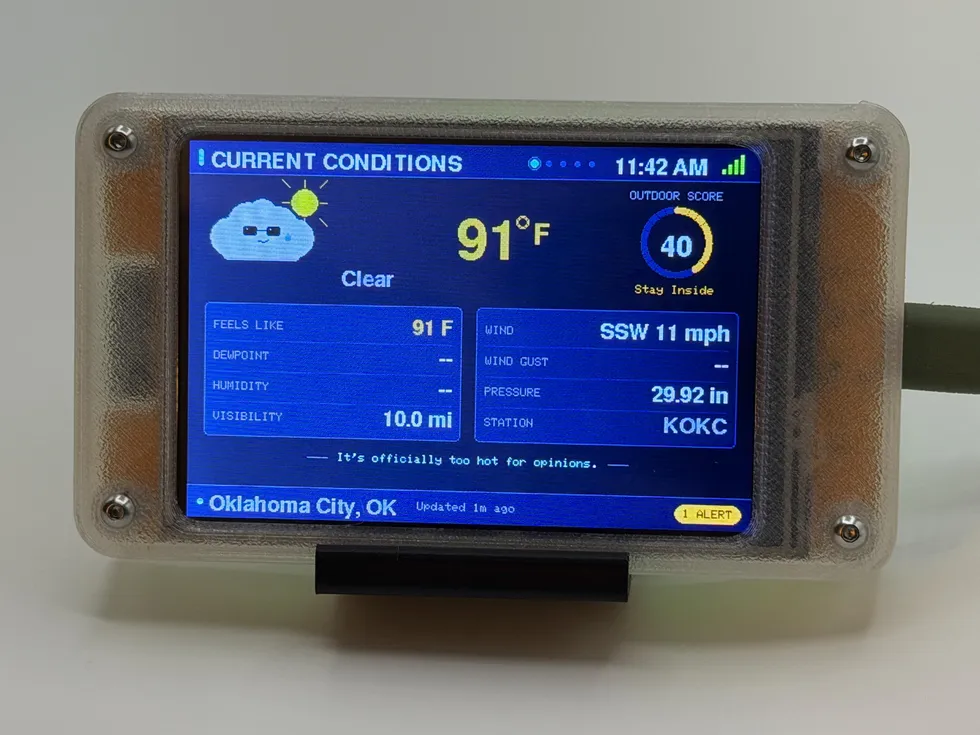
Storm Sentinel also headlines the gift guide for weather nerds & storm watchers, if you happen to be shopping for one.
MORE LAB NOTES
- How to Choose a Desktop Flight Tracker: 5 Questions to Ask
- Magnitude vs. Intensity: The Two Numbers Every Earthquake Gets
- What Is a Starlink Train? The String of Lights, Explained
- Weather Watch vs. Warning vs. Advisory: The Severity Ladder
- The Board Inside Every PlankLabs Gadget
- The Printers Behind the Shells: a Flashforge AD5X and a Bambu Lab X2D
- Arduino: The Workbench My Firmware Is Built On
- How to Read a Tide Chart (and Why Old Tide Clocks Drift)
- What Is ADS-B? How Flight Tracking Actually Works
- When Can You Actually See the ISS? Visibility Windows, Explained
- Is It Your WiFi or Your ISP? How to Tell in 60 Seconds